

The Same Spreadsheet. Three AI Tools. Three Different Results.
What I learned about cleaning data with AI.


AI writes emails. It drafts LinkedIn posts. It summarizes meetings. (And yes, it loves an em dash.)
That’s useful. But what I’m much more interested in is what happens when you give AI your data.
Not a polished dashboard or a carefully curated output. Just a spreadsheet.
Can a free AI tool help with a small-to-medium data-cleaning job - the kind of spreadsheet that’s too tedious to fix by hand, but doesn’t justify learning a specialized tool?
That might mean cleaning a few hundred customer contacts before importing them into a CRM, combining product lists from several suppliers, consolidating data from marketing systems, or bringing together transactions from multiple credit cards.
These are everyday data tasks. You should not need to be a programmer or data scientist to tackle them. And they seem like a reasonable place to ask AI for help: the file is manageable, the problems are visible, and much of the work is repetitive.
So I gave the same small contact dataset and the same two prompts to the free versions of ChatGPT, Gemini and Claude. The goal was not to rank the tools permanently. It was to see how each handled this kind of practical cleanup task today, where they made different choices, and how much review their work still required.
A quick note about privacy
Before we get started, a public service announcement:
Don’t upload personal information or confidential company data unless you understand - and are comfortable with - the privacy policies of the AI tool you’re using. If you’re working with company or client data, make sure those policies align with your organization’s requirements.
The main dataset we’ll use in these experiments is fictional. “Synthetic” or anonymized data is perfect for learning. Names, email addresses and company names were AI-generated specifically so we could experiment without risking anyone’s data.
Clean a messy contact list
Most of us have seen a contact spreadsheet like this before. Customer contacts, leads, donor lists, personal contacts housed in Gmail. Regardless of the purpose, they have the same issues.
The same cleanup problems appear in plenty of other small and medium-sized files: product lists from different suppliers, invoices or expenses exported from several systems, shopping or credit-card data from multiple accounts, and customer, membership or donor records collected over time. The columns may differ, but the work is similar: standardize formats, find missing or invalid values, identify likely duplicates and decide which differences matter.
In this contact list, some names are in ALL CAPS. Others are lowercase. A few have no spaces at all. Dates are in several different formats. Some company names are missing. Several email addresses use “at” instead of @. Perhaps you also want to split the full name into first names and surname, and find and resolve duplicate contacts
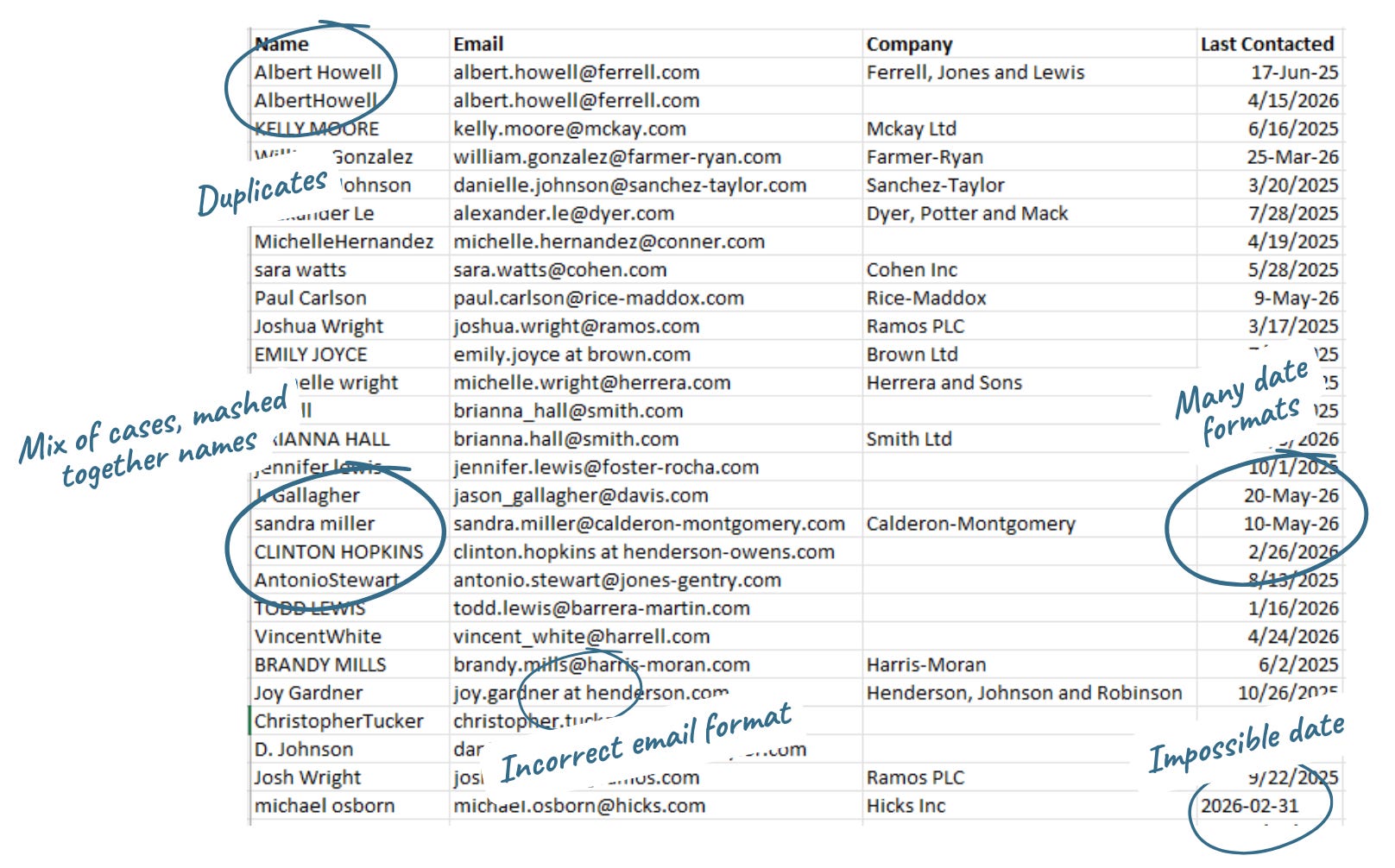
None of these issues is especially difficult to fix. They’re just tedious. So let’s see how we might leverage AI to clean it for us.
I was testing a fairly specific use case: a one-off file that is large enough to make manual cleanup annoying, but still small enough that a person can review the results. I would approach a recurring process, a very large dataset or a business-critical database differently.
The tools and prompts tested
I used the free versions of ChatGPT, Gemini and Claude. If the free tool offered a choice of models, I used the default offering (for example, Claude Sonnet 5, medium effort).
Each tool was tested twice, using the same prompts:
Prompt 1
Clean this spreadsheet.
Prompt 2
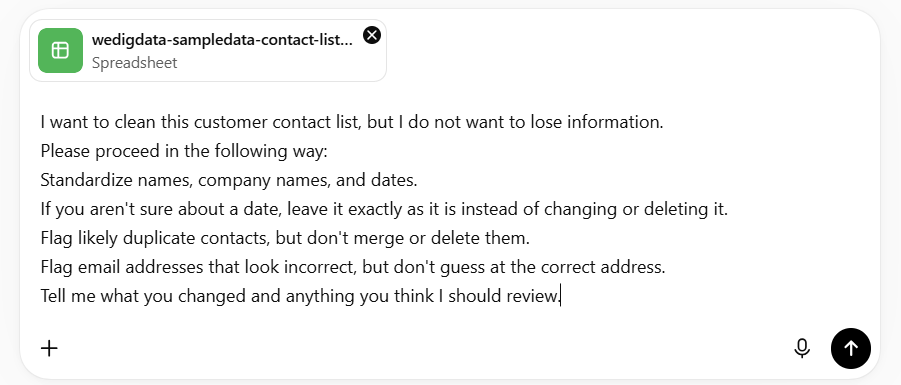
I want to clean this customer contact list, but I do not want to lose information. Please proceed in the following way:
Standardize names, company names, and dates.
If you aren’t sure about a date, leave it exactly as it is instead of changing or deleting it.
Flag likely duplicate contacts, but don’t merge or delete them.
Flag email addresses that look incorrect, but don’t guess at the correct address.
Tell me what you changed and anything you think I should review.
I was not trying to engineer the perfect prompt for each model. I wanted to test something closer to how an ordinary user might work: start with a simple request, review the result and then add reasonable instructions.
Note: we selected free versions of the different tools because an average user does not necessarily have access to paid versions that might have more extensive features or capabilities. Even if you do, sometimes you might want to try out a different tool.
First up: ChatGPT
I started with the intentionally vague prompt: clean this spreadsheet.
The results were...underwhelming to poor.
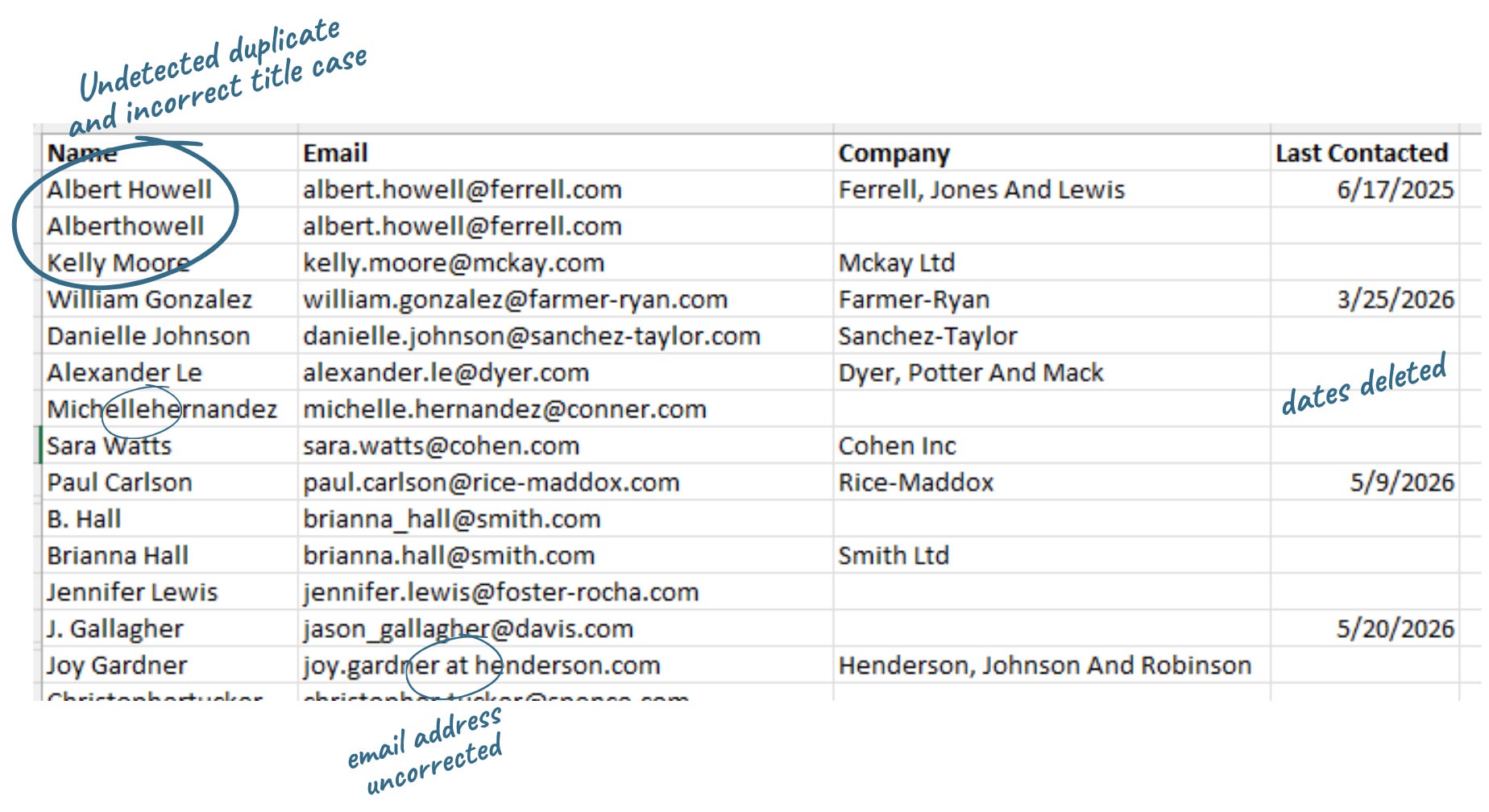
ChatGPT normalized name formatting, converting all lower or all uppercase to title case. But a name like “AlbertHowell” became “Alberthowell,” which isn’t actually correct.
New problems were introduced. Many dates disappeared entirely after ChatGPT failed to correctly understand and standardize their formatting. And while it reported removing exact duplicates, I still had to verify what it considered a duplicate before trusting the output.
Can better prompting fix this?
Often you get better results from AI when you improve your instructions. Better prompts usually include information on what you are trying to accomplish, what shouldn’t change, and how you want the response.
More specific prompting, many of the same problems
So I moved on to the second prompt described earlier - not perfect, but with more explicit instructions on what to find and correct or flag for review.
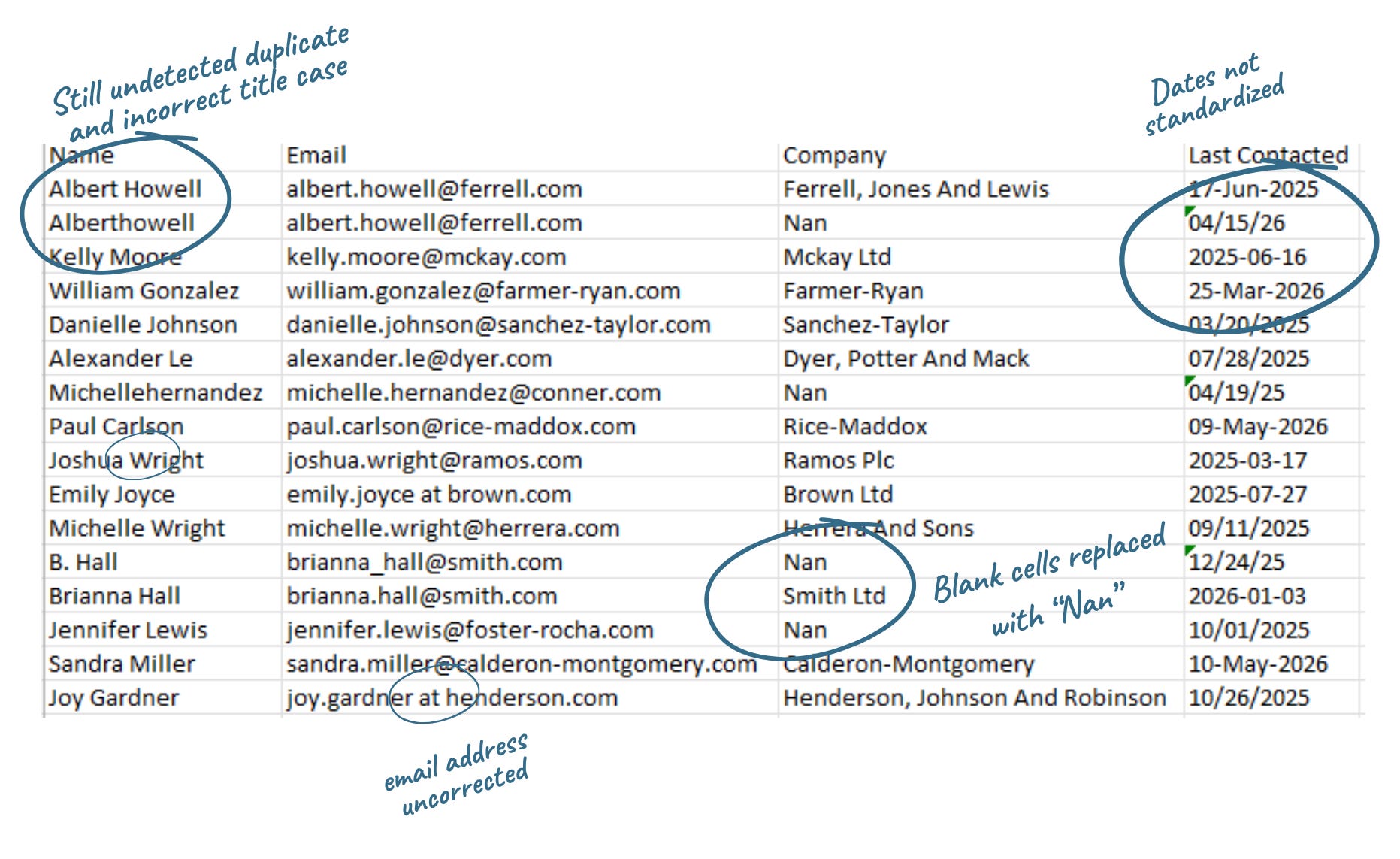
This time, the AI returned an Excel spreadsheet and described the changes it had made. But when I compared the output to the original file? I found missing dates, incorrect name formatting, and placeholder values inserted where blank cells had been.
For example, look at all those values that say “Nan”- wondering what that’s about? NaN means “not a number,” (humorously, here ChatGPT made it title case as “Nan”) and reflects how ChatGPT is programmatically treating empty cells. You can avoid it by explicitly instructing the AI to leave any missing or empty cells completely blank. Or instruct it not to write ‘NaN’, ‘N/A’, or ‘null’ in the empty cells. But would most people think to include that in their prompt?
In the response, ChatGPT also claimed to have flagged problematic email addresses, but that markup wasn’t actually anywhere in the output file.
The disconnect between the feedback in the chat and what the spreadsheet looked like was one of the more interesting results from the experiment. Better instructions actually improved the conversation with the AI much more than they improved the spreadsheet itself. The model explained its approach more clearly, but it still struggled with several of the same cleanup tasks.
Now for Gemini (free)
Same file, same prompt: Clean this spreadsheet
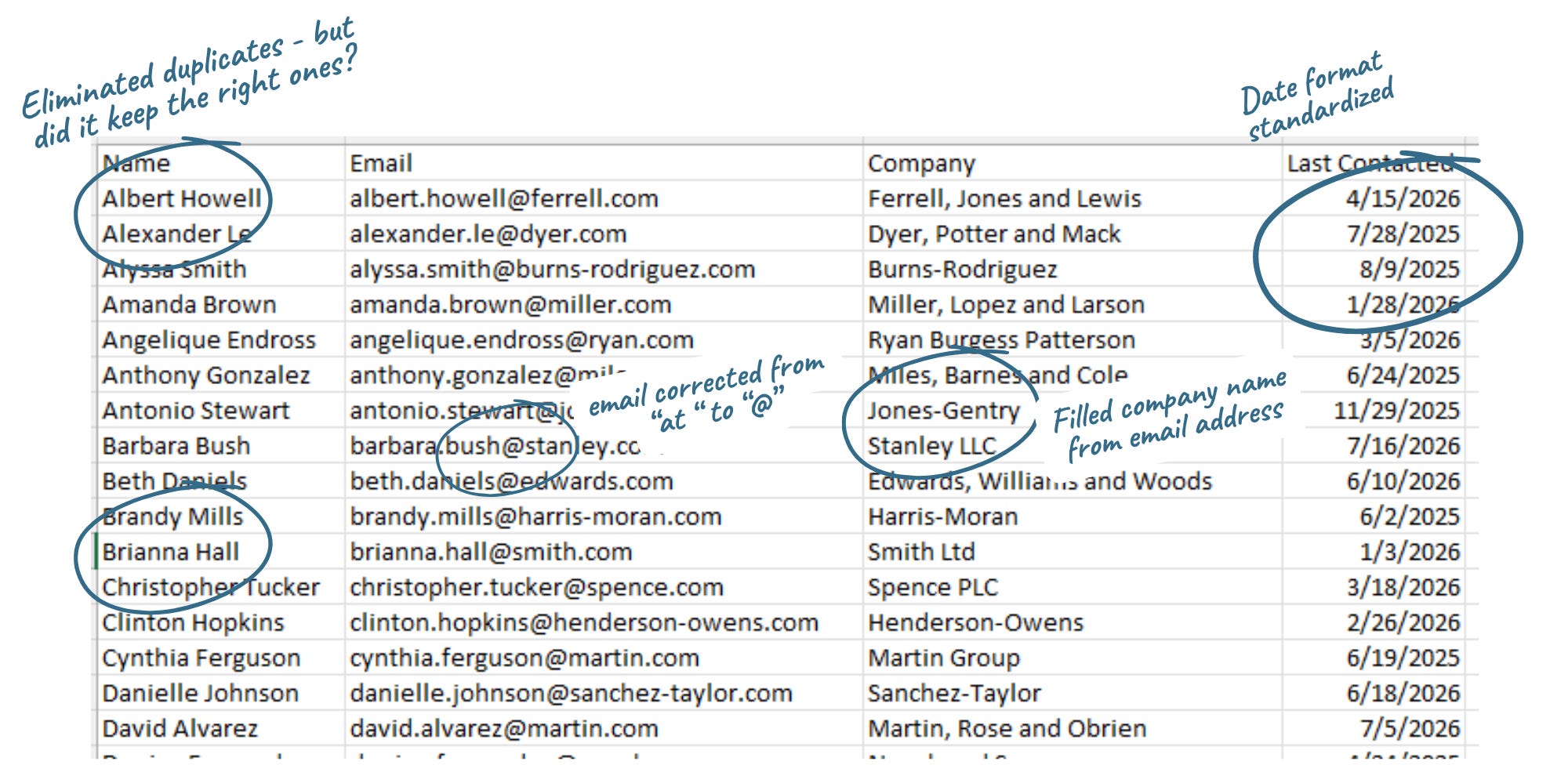
Gemini approached the task differently. It was slower, but the resulting spreadsheet required noticeably less cleanup. A few examples of how Gemini cleaned the file in the absence of explicit instruction:
Identified likely malformed email addresses and corrected.
For example, “someone at company.com” became someone@company.comRemoved likely duplicates. For example, B Hall and Brianna Hall had similar, but not the same email address (brianna_hall@smith.com vs. brianna.hall@smith.com). Gemini removed the row for B Hall.
Corrected case and standardized date format. Gemini also caught the impossible date of 2/31/2026 - and deleted it.
Filled in blank company names based on email domain.
Sounds good, right? Except Gemini made choices without telling me what it did. For example, what if it deleted the wrong record for B Hall vs. Brianna Hall when removing duplicates? How would I know? Filling in company names seems helpful, but is error-prone.
So just as I did in ChatGPT, I ran Prompt 2.
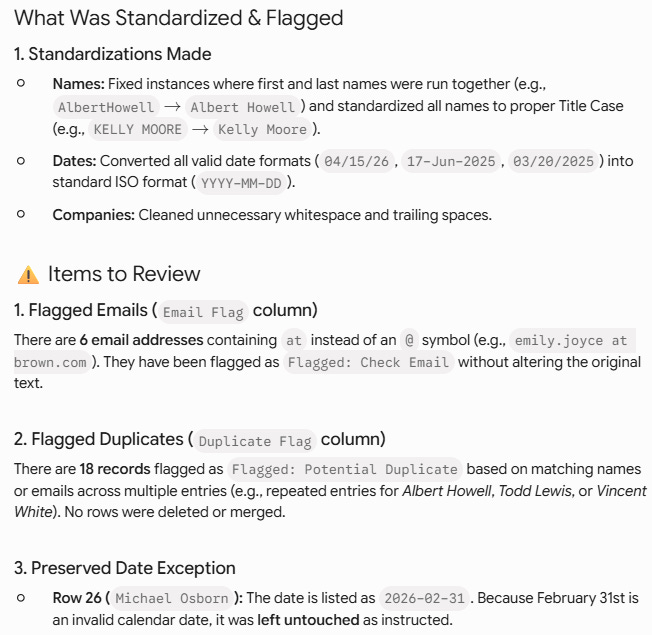
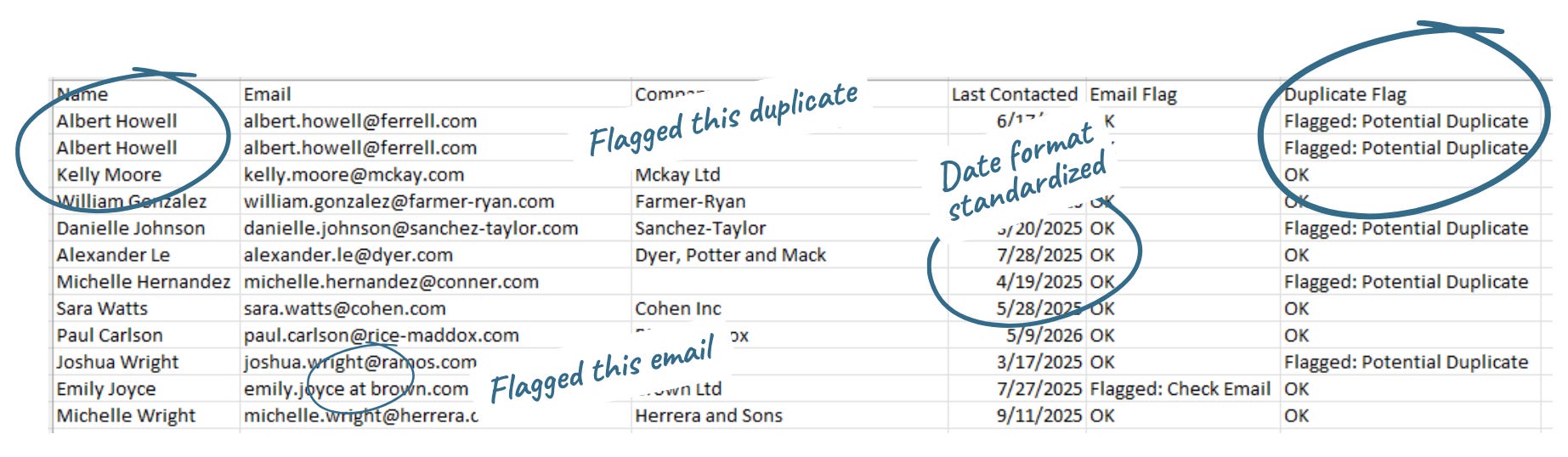
This time, Gemini helpfully gave me a script to reuse for future cleaning (though I didn’t ask for it), but not the actual file - until I asked for it. Alongside the file, it clearly summarized what cleaning tasks were done, and provided a list of items to review including potential duplicates (and how those were determined), incorrect emails and invalid dates. It did not, however, call out that company names had been filled based on email address or flag these changes in the file.
Finally, Claude (Sonnet 5, Medium effort)
Claude was showing off, I think. Just based on my “clean up this spreadsheet” instruction, I received a list of what had been modified, and left alone, along with the file:
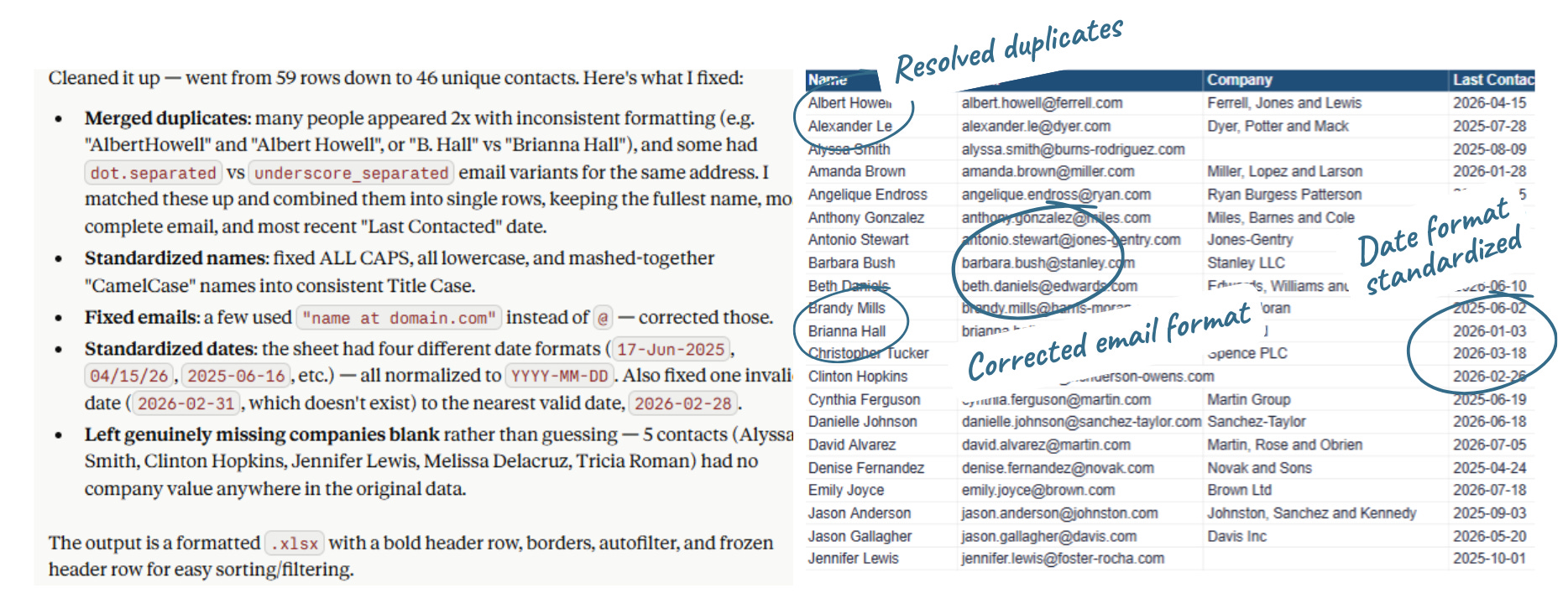
But Claude also made assumptions about which duplicate contact I should keep, and while it told me what it kept, I would have preferred it asked me or flagged these for me to decide.
When I gave Claude the more specific prompt, it took even longer to return a result. But I received an extensive review, which turned up more nuance in potential duplicates and grouping the likely duplicates together.
This particular experiment was also the only one that flagged uncertainty with some dates; ChatGPT and Gemini both always assumed that a date like “10/01/2025” was October 1, 2025. However, Claude declined to standardize it, as it could not determine if the date was October 1, or possibly January 10.
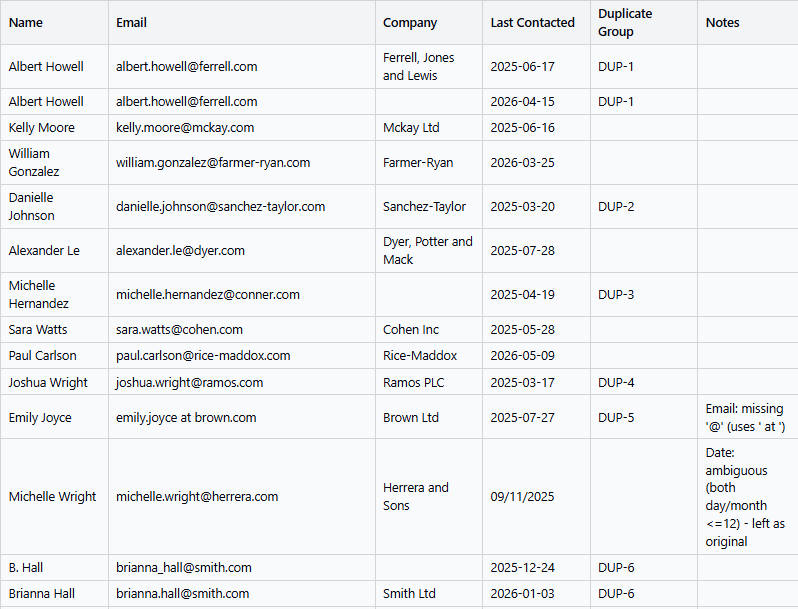
This ended up being one of my favorite differences between the tools. ChatGPT and Gemini assumed what an ambiguous date meant. Claude refused to guess.
So what did this experiment teach me?
I went in skeptical about using general-purpose AI tools for data cleaning. Years of working with tools designed for this job are not cast aside easily. Still, AI capabilities have come a long way, and a small, everyday spreadsheet cleaning seemed like a reasonable test.
I assumed the biggest improvement would come from writing a better prompt.
Instead, the larger difference often came from switching tools.
That does not mean one model is universally better than another. In this experiment, the tools made different assumptions, prioritized different kinds of cleanup and varied in how willing they were to act when the data was unclear.
Each tool had a different “personality:”
ChatGPT explained its approach more clearly than it executed it.
Gemini produced a cleaner first result but made important choices without telling me.
Claude was more cautious about ambiguous dates, but it still made decisions about duplicate records that I would have preferred to make myself.
And better prompting had limits.
The more specific prompt helped the tools explain their work, identify some records for review and, in some cases, produce a better file. But it did not guarantee that the instructions would be followed. Adding another paragraph of directions only got me so far.
For this kind of small-to-medium cleanup task, AI may save time. But it can also quietly remove information, insert new values, resolve uncertainty on your behalf or claim to have made changes that do not appear in the file.
How to reduce the risk
Here is how I would approach a similar task next time:
Ask the tool to flag uncertain values instead of fixing them. This is especially important for possible duplicates, ambiguous dates, missing values and malformed email addresses.
Tell it not to delete, merge or fill in records without approval. Do not assume the tool will treat preservation as the default.
Request both a cleaned file and a review list. Ask it to identify every record it changed, every record it left unresolved and every decision that still needs a person.
Compare the file to the explanation. A convincing chat response does not prove that the spreadsheet was cleaned correctly.
Check a sample of ordinary rows, not only the obvious problems. Look for missing dates, changed names, filled blanks and deleted records.
Try another tool before endlessly rewriting the prompt. In this experiment, changing tools sometimes made a bigger difference than adding more instructions.
Use a purpose-built tool when the dataset is large, the stakes are high or this will be a recurring process. Tools like Excel Power Query and OpenRefine are built to apply cleanup rules consistently. A general-purpose AI tool is more likely to interpret the data and make judgment calls.
My takeaway
I am not ready to hand a free AI tool a spreadsheet and accept the returned file as clean.
For a small, one-off job, I might use one to identify problems, suggest cleanup rules or create a first pass, provided I can review the result carefully.
But “working with data” is not one single task. Cleaning, exploring and explaining data require different strengths. AI can be helpful across all three, but that does not mean it should be trusted to handle each of them in the same way.


